Business template
Status Page
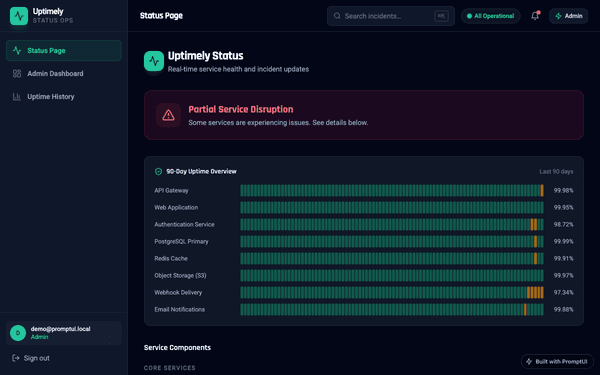
Public status page with per-service health, uptime history, and an incident timeline.
Build this Checked before it goes live
Who it is for
Teams who currently answer "is it down?" in a support inbox.
What it does
- Publish current service status
- Post incident updates
- Show uptime history
Common in
SaaSTechnologyInfrastructure
The brief we build from
This is the exact instruction PromptUI starts with. You can change every word of it before or after the first build.
Build a public status page for a SaaS product. At the top show an overall system status banner (Operational / Degraded / Major Outage) with a colored indicator. Below, list service components (API, Dashboard, Webhooks, Database, CDN) each with a health pill and a 90-day uptime bar made of small day segments (green/yellow/red) plus an uptime percentage. Add a reverse-chronological incident timeline with severity, title, timestamp, and short status updates (Investigating → Identified → Monitoring → Resolved). Include a "Subscribe to updates" email field. Use calm, production-ready styling with clear status colors.
Other business templates
SaaS Dashboard
Admin dashboard with sidebar, metric cards, a data table, and dark-mode toggle.
Admin Panel
Full CRUD admin panel with users table, search, and modals.
Analytics Dashboard
Data analytics dashboard with charts, filters, and data tables.
Settings Page
User settings page with profile, notifications, billing, and security tabs.
Start from this template
PromptUI builds it, checks that it actually runs, and helps you put it online. Free to start.
Build this